
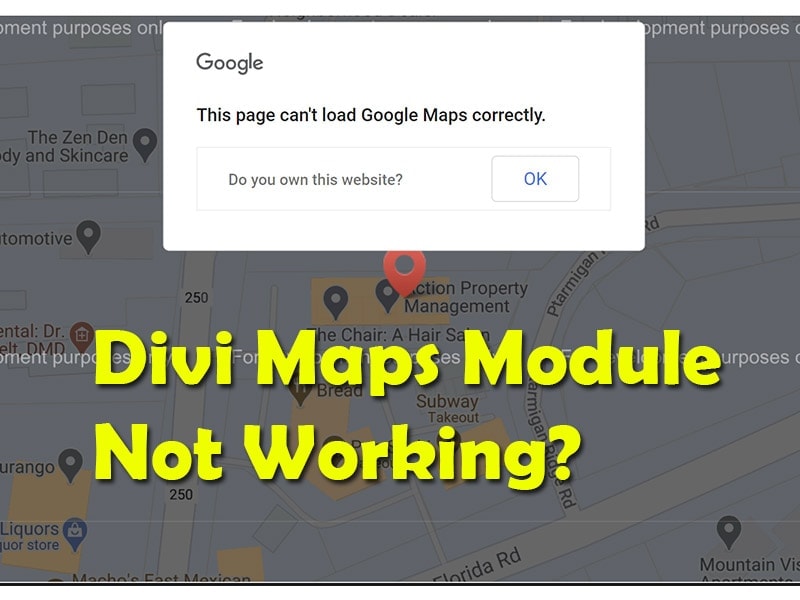
Divi Maps Not Working with API Issues Created November 21, 2020 Are you having trouble getting your Google Maps module on Divi to display properly? If you are building a website with the popular Divi theme, then you might have come across a maps module that looks like this. This could flash when you first try and add a Google Maps module or when you upload a premade template from the Divi library. Being able to properly display the maps module takes an API key from Google Cloud Console and requires a billing profile and a few extra steps. Unfortunately, (and in my most humble opinion) Google Cloud Console is clunky and difficult to navigate, and understanding the proper way to connect it with Divi can lead to confusion. Hopefully, these steps can help you avoid the long hours of frustration of something that should have been super simple. How to Connect Google Cloud Console to Divi Google Maps Here are the steps required to display the Google Maps module correctly and some common mistakes you might run into along the way. Step 1: Create a new project on Google Cloud Platform The first thing you want to do is head over to Google Cloud Platform and create a new project. Name your project and connect it to your Google billing account. **Important Note – While most small business websites will not incur any charges from Google, it is still required to include billing information for each profile and you are only allowed to have 2 projects running on a single billing profile. If you are working with many clients that use Google Maps on their website, you might need to set up a different billing account for each client. ** One common error that many people run into when the maps module is not displaying properly has to do with an incorrect billing setup. Remember, a single billing account can only be used for two projects. Step 2: Create APIs Required for the Divi Maps Module Open the main menu for the Google Cloud Platform and hover over “APIs & Services” and click on “Library”. **Note – This next step is important and usually is the most common issue with the maps module not displaying correctly. ** You will need to enable 2 different APIs for the Divi Maps Module to display correctly. Maps JavaScript API Geocoding API Often, Divi builders will simply enable the Maps JavaScript API (Maps for your Website) and will not know they need to enable the Geocoding API as well. Once you have enabled both the Maps JavaScript API and the Geocoding API, it is time to gather credentials to plug into the Divi theme. Step 3: Create Credentials to use Google APIs on Divi Next, head back to the main menu of Google Cloud Platform, hover over “APIs & Services” and click on “Credentials”. On the credentials page, click on “+ Create Credentials” located at the top of the page and then clock on “API key” to create your new API key. Now you have your API key that is ready to plug into the Divi theme. (Optional) Step 4: Restrict API Key You have the additional option to restrict the API key to specific rules to eliminate the possibility of someone stealing your credentials and using it in a different area on the web (and charging your billing account for it). You can restrict the key by specific APIs, IP addresses, or web sites. For our clients, we will simply restrict the key to match the exact website address. Step 5: Add the API key to the Divi Theme In this final step, you will add the API key to the Divi theme to be used throughout the website. In the backend of your WordPress build, click on Divi and “Theme Options” in the left side menu. Under the General tab of the Divi Theme Options is an option to add a Google API Key. Copy the API key you created and paste it here and then click “Save”. Finally, refresh the current page displaying the map and voila! You now have a working Divi Maps module. Divi Maps Module Still Not Displaying Correctly? If the maps module is still not displaying correctly, right-click on the page and click “Inspect” to view the page source code. From here, click on “Console” to display JavaScript loaded on the page and if there is something wrong with the Maps module, it will be displayed here and will give you the information you need to move forward. We know just how frustrating it can be when there is a technical problem when building a website. We hope that this guide was able to eliminate one of those headaches to get you back on the creative process. Good luck! (function(d, s, id) { var js, fjs = d.getElementsByTagName(s)[0]; if (d.getElementById(id)) return; js = d.createElement(s); js.id = id; js.src = "https://www.berush.com/static/webpack_bundles/remote.js?v=9"; fjs.parentNode.insertBefore(js, fjs); }(document, "script", "berush-widget")); (adsbygoogle = window.adsbygoogle || []).push({}); Is Your Business Being Found Online? Free Digital Marketing Report ($150 Value) Want to know how your business stacks up against the competition? Learn More Read more articles about Web Design. 5 Website Design Mistakes that May be Killing Your Sales Funnel It’s very common to see websites that look good on the surface but are not actually delivering the goods in terms of sales. Sadly, many small business owners who have such websites don’t know they are unwittingly turning away their customers. If you are a business... Read More How To Ensure A Fantastic Website User Experience That Will Keep People Coming Back Your website isn’t just an accessory; it’s often your customers’ first and most lasting impression of your brand. It can be the difference between someone becoming a loyal customer or bouncing over to a competitor. Providing a truly exceptional user experience (UX) is... Read More Mastering User Experience in Modern Web Design Strategies How do you build websites that attract users who want to return repeatedly? Modern web design has grown beyond simple aesthetics to focus on creating meaningful user experiences. The aim of user experience design is to establish connections with users through... Read More The Key Elements of Effective Site Architecture The success of a website may all but boil down to the site architecture. This basically refers to the elements that determine how easily users and search engines can visit and make use of your content. It goes without saying that a site that's well-structured can... Read More Web Design: A Guide From Concept to Creation Web design includes all the steps involved in planning, creating, and maintaining websites. It combines visual design, content creation, user experience optimization, and technical development to build effective sites that help organizations reach goals online. ... Read More The Ultimate Guide to Hiring Web Design Services: Crafting Purposeful Online Presences An optimal web presence represents a brand as professionally, memorably, and purposefully as possible across first impressions and ongoing engagements alike. However, masterminding intuitive designs, integrated functionality, and responsive layouts demands deep... Read More Expert Tips for a Smooth Website Migration Process A website is a necessity, not a luxury, in today's digital age. Seventy-one percent of businesses had an online presence in 2023, displaying their products, services, and brand stories to a global audience, according to a recent study. However, for your changing and... Read More Web Design in Scotland: Blending Art and Expertise In the digital age, a strong online presence is crucial for businesses and individuals. A well-designed website serves as the virtual storefront of the modern world, leaving a lasting impression on visitors. To create an exceptional web presence, one needs the skills... Read More (adsbygoogle = window.adsbygoogle || []).push({}); (adsbygoogle = window.adsbygoogle || []).push({}); Read more articles about business. How to Scale Your Marketing Output With Outsourced Tech Writers In the highly competitive tech industry, there’s no such thing as too much marketing. Staying ahead of your competitors is a full-time job for multiple people, with content demands alone often being too high for your in-house team to meet. If you’ve got a backlog of... Revving Up the Regional Economy: Small-Scale Logistics as a Business Force Have you ever wondered how the movement of goods within your local region creates a ripple effect that strengthens entire communities? While global supply chains grab headlines, it's often the smaller, specialized logistics operations that form the backbone of... A Car Accident Attorney Can Help Clients With Speech or Language Issues Navigate Claims: Here’s How! Car accidents take place in San Diego for many reasons, and such mishaps do not discriminate. Whenever it takes place, you may feel baffled, scared, or unsure about what to do next. It can be taxing for any car accident victim. However, the uncertainties and troubles... Exploring Cost Benefits of Nearshore Outsourcing for Startups Craving some hidden cost benefits for your startup? Let's cut to the chase. Every startup faces the same dilemma. You need the best talent to build your product, but you've barely got a few thousand dollars to your name. The good news? Nearshore outsourcing companies... Top 5 US Link Building Services For Businesses Building a strong online presence is non-negotiable for any business aiming to stay ahead of the competition. One of the most effective ways to improve your visibility and climb the search engine ranks is through strategic link building. But not all agencies are... Essential Steps for Building a Strong Business Foundation Want to avoid becoming another failed startup statistic? Setting up a new business isn't just about having a great idea. It's about building something that can actually survive and thrive. After all, with 90% of startups failing within their first few years, getting...

How to Increase Visits from Google Maps
How to Increase Visits from Google Maps